Models
aituner only offers models that will actually load and run well on your Mac, and shows why.
Where the list comes from
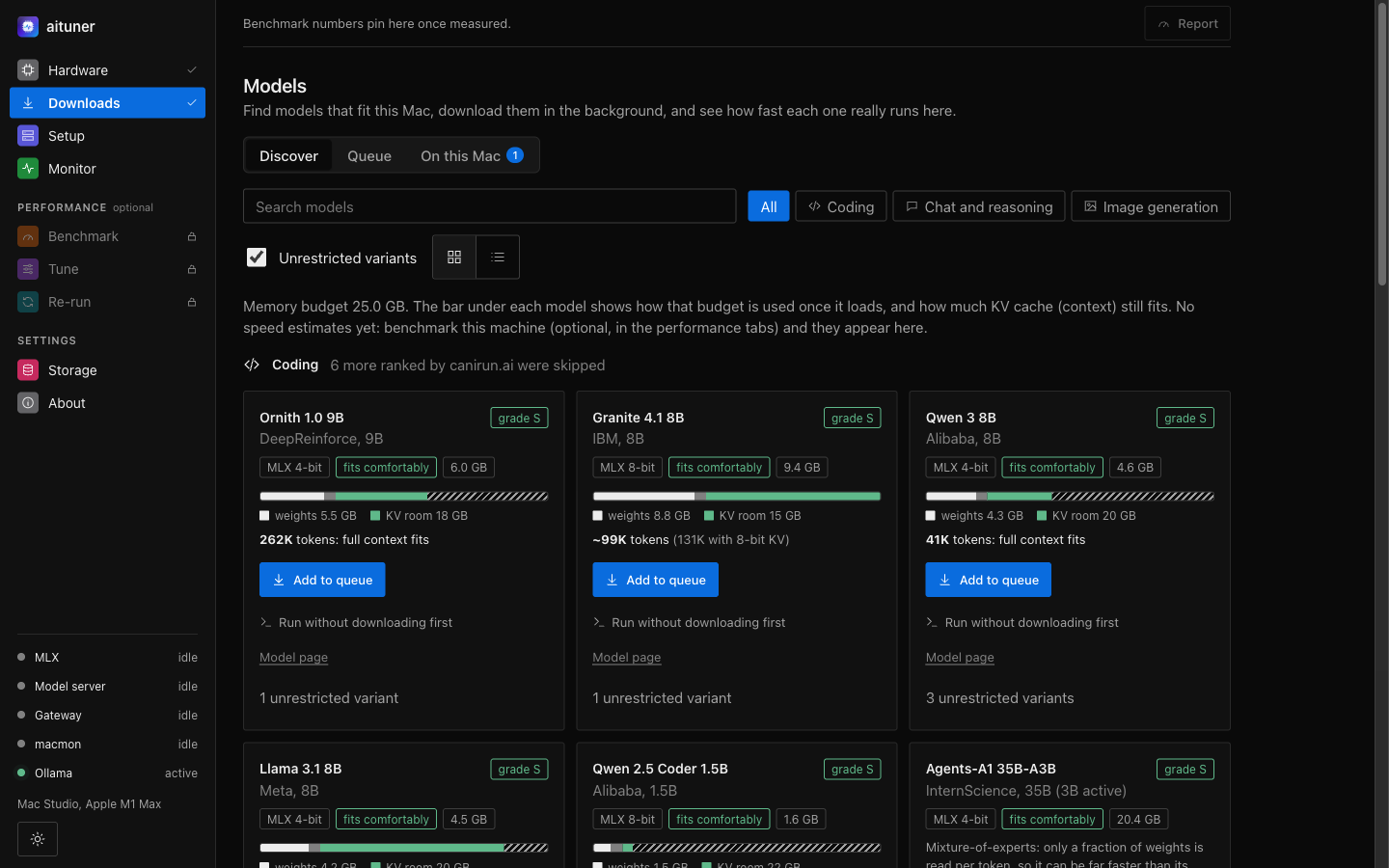
aituner asks canirun.ai which models suit your hardware, then finds each model's Apple Silicon (MLX) build on Hugging Face and checks that the installed mlx-lm supports its architecture. Community "unrestricted" variants are included and can be hidden.
Will it fit?
The memory bar under each model shows how your GPU memory budget is used once it loads: the weights, the runtime, and the room left for the KV cache, which sets how much context the model can hold. The budget is what macOS lets the GPU use, measured on your Mac rather than assumed.
Downloading
Add a model to the queue and it downloads in the background, one at a time, in order. aituner fetches only weights, config and tokenizer files (safetensors, never code or pickles), verifies each file, and can resume an interrupted download. Models go to your models folder, ~/Models by default; a network share works too.
How fast is it here?
In Downloads, On this Mac, press Measure speeds to benchmark your downloaded models with real source code as the prompt. Each model shows three numbers:
- Reads: tokens per second while taking in your prompt.
- Writes: tokens per second while answering.
- First reply: the wait before the first word of a Claude Code request through aituner's lean launcher.
The recommended model is the largest one that still writes at an interactive speed: bigger models write better code.